✕
EduWriter: Processing...
0%

Try EduWriter Premium
Create without limits by upgrading to an unlimited plan.
 Unlimited AI generation 🚀
3 Plagiarism Reports ✅
Unlimited Paraphrasing
15% off Human Editors
Access All AI Writer Models
Unlimited AI generation 🚀
3 Plagiarism Reports ✅
Unlimited Paraphrasing
15% off Human Editors
Access All AI Writer Models
Upgrade
 Join 17,208 researchers improving their writing with EduWriter.ai
APA Format & Citations Generator
Want to achieve flawless academic results in terms of formatting, citations, and references? Our APA format and citations generator does the trick! From in-text citations to reference lists and document structure, everything will be formatted according to the APA 7th edition standards.
Choose Your Model
✕
Download APA in:
Google Docs
Whether you are working with books, peer-reviewed journals, or websites, our sophisticated APA format generator handles everything, eliminating the need for tedious manual formatting. Join thousands of scholars and researchers who trust Eduwriter.ai’s APA format and citations generator to produce exceptional papers, dissertations, and theses!
Feature / Model Comparison:
APA Format Generator vs Cite & Reference in APA
| Feature / Model | APA Format Generator (Existing Citations) |
Cite & Reference in APA (Plain Text) |
Premium Plan Benefit |
|---|
Best Scenario for APA Citation Generator
When your manuscript already has citations and references, you don’t need to change the existing structure to fine-tune formatting and style. Our APA Format tool knows that and converts your paper into an APA 7th edition MS Word or Google Docs file with a proper reference page.
Pro Tip: If your manuscript has in-text citations but lacks a list of references, our model will take care of it. However, the accuracy of the reference list will depend on the authenticity of the original citations.
Best Scenario for Citations and APA References
When you want to add real and verifiable citations and references in your plain text, our tool does it with a single click. No manual tweaking and fine-tuning needed!
Pro Tip: If you add a paper with existing references and citations, the model will remove them and add its accurate and verifiable in-text citations with references.
Eduwriter’s APA Style Generator
Discover the versatile power of Eduwriter’s Citation Generator. Built purposefully for the modern academic landscape, this free digital tool optimizes your workflow, making sure that every scholarly project you work on meets rigorous APA guidelines in seconds.
Features that Make Us Stand Apart
- Fast Production and Accuracy: Our tool combines lightning-fast processing with surgical accuracy to provide what our clients consider the gold standard in citations generator.
- Intuitive Navigation and UI: There is no learning curve when it comes to our APA formatting tool. The seamless navigation experience makes everything come together naturally.
- No Ads, No Distractions: The APA citations tool shows no ads, meaning no distractions for scholars while ensuring compliance with the standards.
- Diverse Academic Support: Whether you are asked to follow the 6th or 7th edition of the APA guidebook, the Eduwriter’s APA formatter takes care of both, with a single click!
Potential Users of APA Converter?
If you are asking whether you will get any value from our APA converter, let us make it clear to you. Anyone who has some stake in academic writing and editing, be it in school, university, or as a professional, will find that the tool will work wonders for them. From students to academics and full-time academic writers, everyone will make their work easier and hassle-free without missing a beat.
APA Citations Made Simple with Our Style Generator
The grass is clearly greener on this side of the fence if you want to come down off it and make your academic writing better and more efficient. It would not be an overstatement to say that students find the manual style guides too cumbersome and counterintuitive to follow. That’s why we came up with a smart and reliable solution!
The moment you get to this page, you realize that ease of operation and straightforwardness are the norm. The process of getting citations and references to your paper or essay is just a few simple steps away. Once the work is done, you can download the finished file to your computer and submit it for evaluation with full confidence.
How to Cite with APA Citation Generator
Your Guide to APA Style of Citation
The APA style guide is the staple in social sciences and humanities where scholars need to provide references from books, journals, online articles, websites, and podcasts. It is important to comply with the standards to make sure papers are authoritative and research-friendly. In the midst of all this is the APA Format Generator by Eduwriter, which generates citations with a couple of clicks and steps. In the end, users get a publish-worthy paper or essay without getting bogged down by the menial, repetitive tasks.
Basics of APA Citation
Basic Rules of Citation in APA Style
Contrary to other referencing styles, APA prefers the author-date citation style, prioritizing the author and the date of writing for easy discovery. This helps in showing the readers that the information is not only reliable but also recent, adding to its relevance, while respecting and giving due credit to the author.
- Author(s): Correctly formatted surnames followed by initials, utilizing the ampersand (&) for multi-author sources.
- Publication Timeline: Enclosed in parentheses immediately following the author’s name for chronological clarity.
- Title Logic: APA dictates specific sentence-case rules, such as capitalizing the first word of the title, subtitle, and proper nouns, maintaining strict compliance.
- Source Localization: Each digital reference is furnished with a precise URL or a DOI to make sure readers can verify the sources instantly.
Keeping all these things aligned, Eduwriter’s APA Style Citation Generator offers a sleek solution - a form with all the input fields. In the end, the tool does the heavy lifting and produces a paper with all the APA citations and references.
In-Text Citations in APA
Formatting In-Text Citations in APA Style
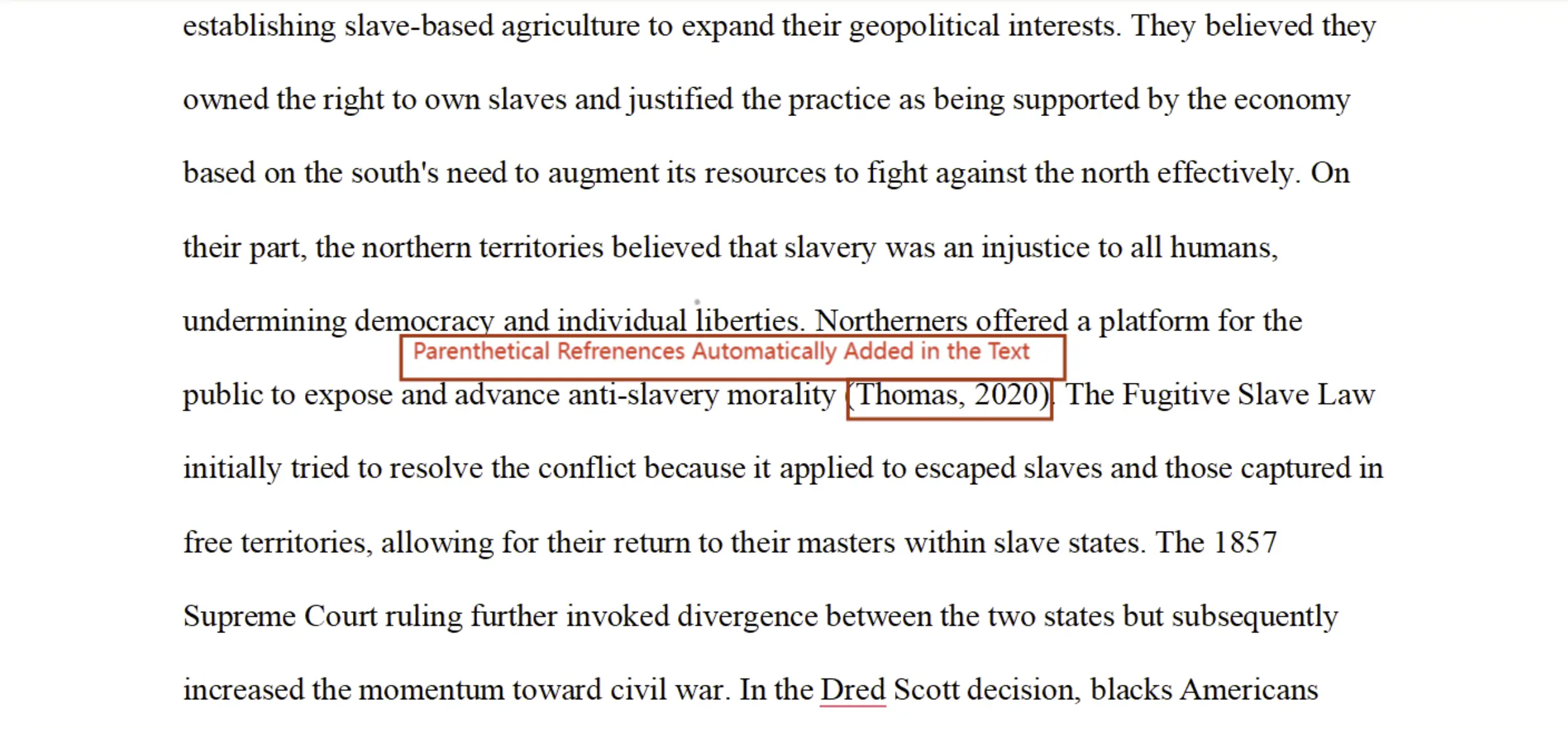
When scholars want to credit the original source without breaking the reader’s focus, in-text citations come into the picture. When using our APA citations tool, you make sure that the paraphrase and direct quote from the author get recognition. This includes the author's name, year, and page number of the book or journal, when required.
- Parenthetical Format: (Smith, 2020, p. 23)
- Narrative Format: Smith (2020) argues that…
However, when you are dealing with complex information, such as multiple authors, you cannot use this formula. Fret not, our generator automatically applies the right “et al.” rules or full listings in line with the current APA regulations. This makes sure that your internal citations are never flagged for errors!
APA Reference List
When writing a paper in APA, the final bibliography serves as the backbone of the research. This is because it allows your peers and instructors to explore your sources. Here is something else it does:
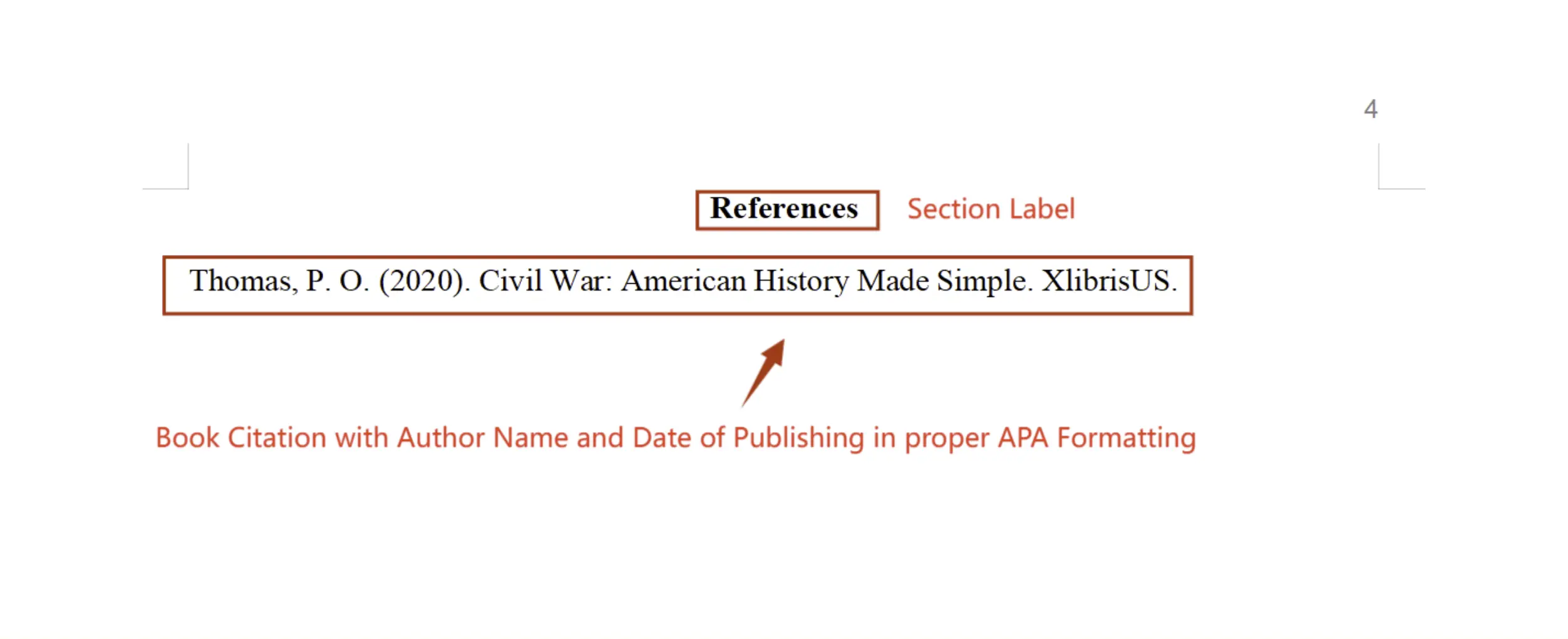
- Features a centered, bolded "References" header.
- Organizes all entries in a strict alphabetical sequence by author surname.
- Applies the mandatory hanging indent for a professional visual aesthetic.
The logic engine working at the heart of APA Format Generator covers each specific source, making sure that publication data, volume numbers, and titles are styled with 100% accuracy. This is the value proposition of our tool for our users!
Citation Examples
When you want your paper to be of high-caliber, it needs to have diverse sources, ensuring consistency across all categories.
Books
- Standard Format: Last Name, Initial. (Year). Book Title. Publisher.
- Live Example: Doe, J. (2021). The psychological impact of modern hygiene myths. Academic Press.
Journal Articles
- Standard Format: Last Name, Initial., & Last Name, Initial. (Year). Article title. Journal Name, Volume(Issue), pp–pp.
- Live Example: Doe, J., & Smith, A. (2022). Emerging trends in behavioral neuroscience. Journal of Science, 15(3), 204–213.
Websites
- Standard Format: Title of Page. (Year, Month, Date). Site Name. URL.
- Live Example: A comprehensive guide to APA compliance. (2021, June 8). EduWriter.
Watch APA Format Generator in Action
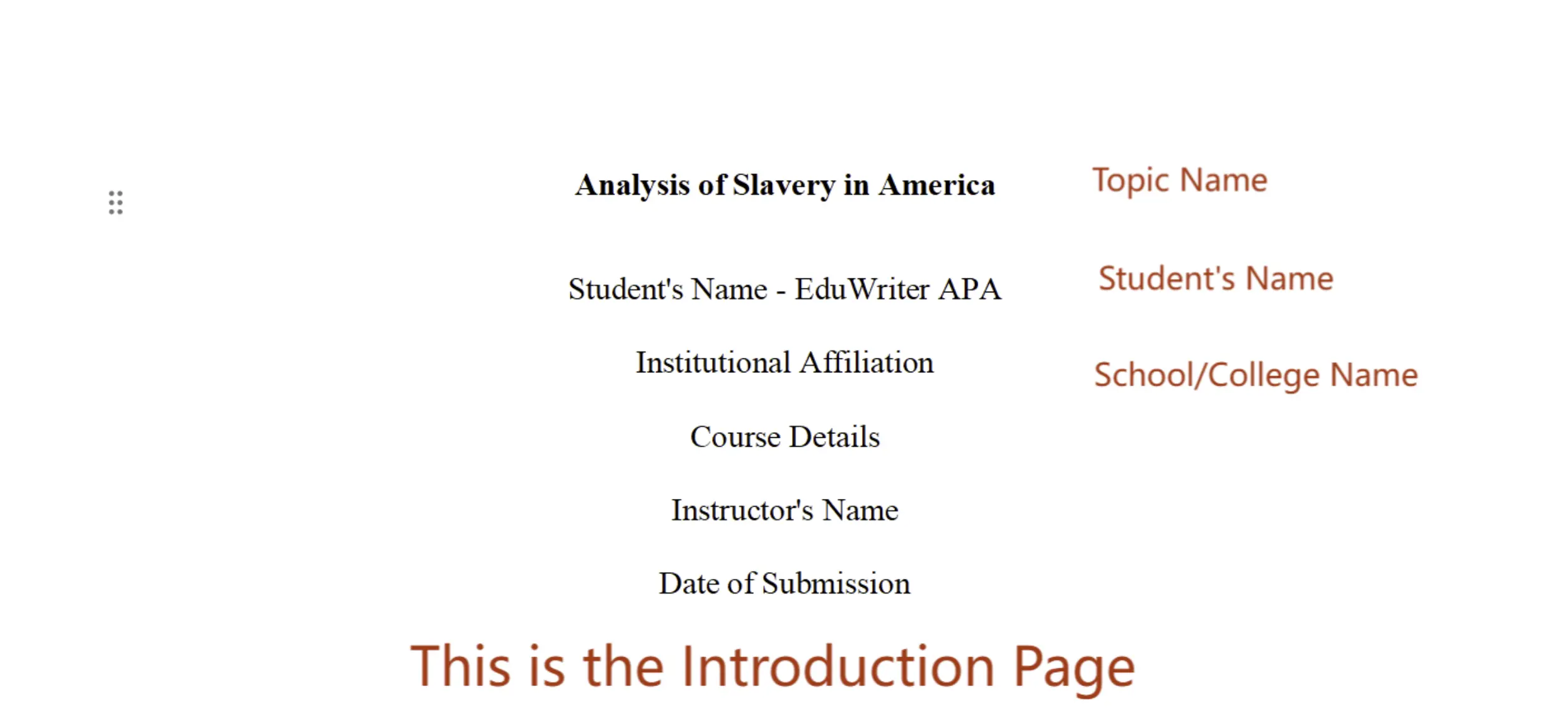
Check out the Eduwriter’s APA Citation Generator in action. Just paste the text into the terminal and click “Convert to APA” and watch the magic unfold right before your eyes - a fully formatted document with integrated references that downloads directly to your device!
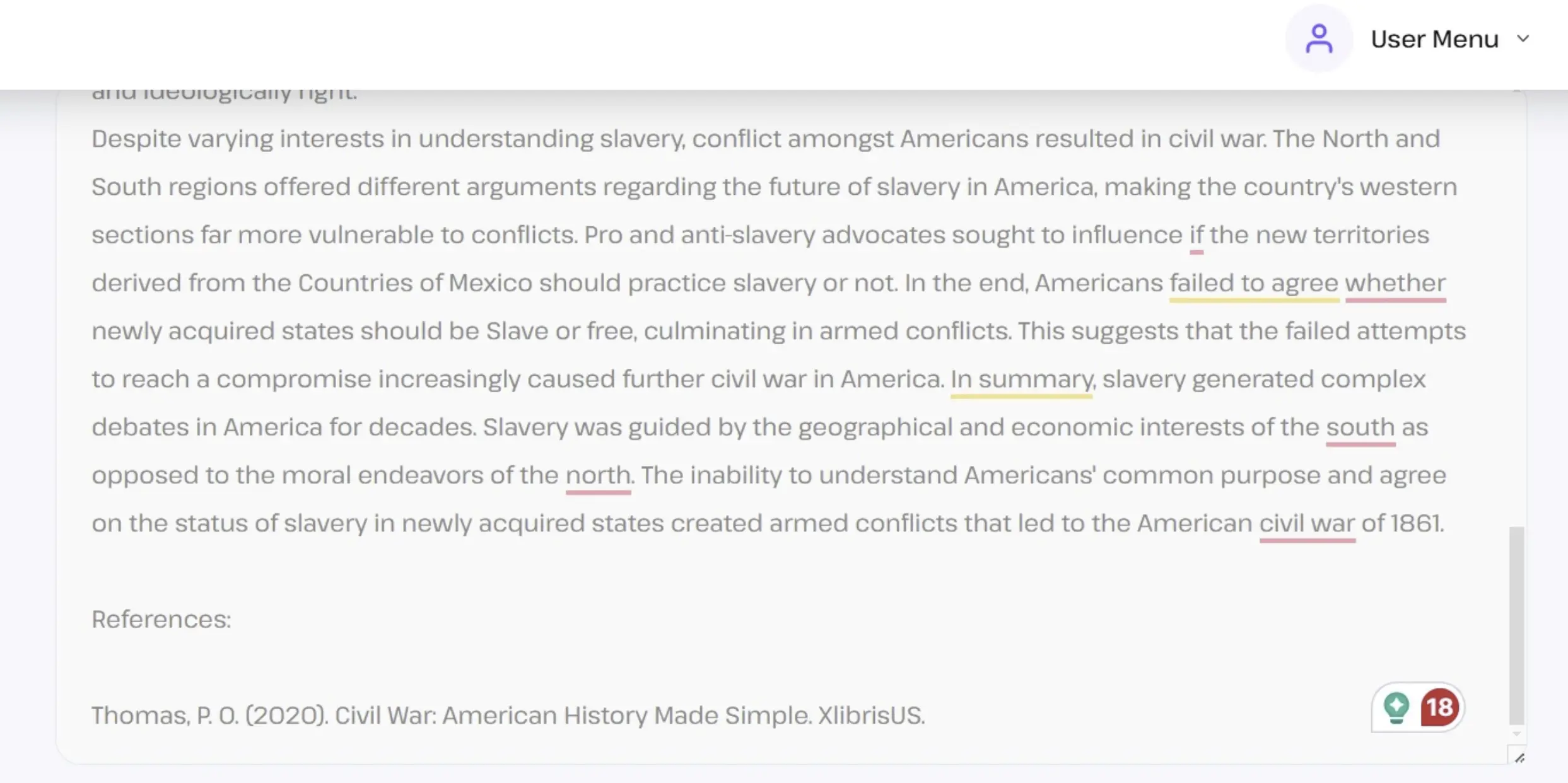
Here is what it is going to look like:
Trusted by Teachers from:




The Ultimate APA 7th Edition FAQ for Students
The Format Generator is used for papers that already have sources but need the correct document structure (margins, spacing, headings, hanging indent). The Cite & Reference model is used for plain text drafts to add new, verifiable, real citations and a complete References page from scratch.
Search Value: Ranks for: "apa format vs citation generator", "apa document formatting tool."
A file ensures complex APA formatting rules, like the hanging indent on the References page and specific page headers, are perfectly preserved, which standard copy-pasting often breaks.
Search Value: Ranks for: "apa generator docx", "apa citation preserves formatting."
Yes. Upload your essay to the Cite & Reference in APA model. Our AI analyzes your text, identifies concepts requiring support, and adds verified APA 7th edition citations automatically.
Search Value: Ranks for: "add citations to essay", "ai find references for paper."
No. A running head is required only for professional papers being submitted for publication. Student papers only need the page number (flush right) on every page.
Search Value: Target: Featured Snippet for "running head student paper apa 7."
The title "References" must be centered and bolded at the top. Every entry must be double-spaced and use a hanging indent (the second line of each entry must be indented 0.5 inches).
Search Value: Target: PAA/Snippet for "apa reference page format", "hanging indent apa."
Use the first author’s last name followed by “et al.” and the year for all in-text citations, even the first one. Example: (Wang et al., 2024).
Search Value: Target: Featured Snippet for "3 author citation apa 7."
The APA 7th edition manual requires you to omit the publisher’s location (city, state, or country) from the reference entry.
Search Value: Target: PAA/Snippet for "apa 7 publisher location."
Treat the AI company as the author. The format is: AI Company. (Year). Query or prompt title [Large language model]. URL of the tool. Cite in-text with the company name and year.
Search Value: Target: High-traffic trending search: "apa citation for ai", "how to cite chatgpt."
List the video’s creator (screen name or real name) as the author. The format is: Creator Name. (Date). Title of video [Video]. YouTube. URL.
Search Value: Target: Featured Snippet for "apa citation youtube video."
You only list the secondary source (the source you read) in the References list. In-text, name the original author and use “as cited in” before the secondary source’s citation. Example: (Smith, as cited in Chen, 2023).
Search Value: Target: Authority search "apa cite secondary source."
Use the Title of the work (or a shortened, capitalized version) and the year. If the title is italicized in the reference entry (e.g., a book), it should be italicized in the in-text citation.
Search Value: Target: PAA/Snippet for "apa citation no author."
Personal communications are cited in-text only and are not included in the reference list. The format is: (Author’s Initial(s). Last Name, personal communication, Month Day, Year).
Search Value: Target: PAA/Snippet for "apa personal communication."